
Alex Kincaid Art Classes FAQ
Thanks for joining us for a class. We hope these answers help you with your questions. If you can't find what you need here, please email support@alexkincaidart.com and we are happy to help you.
How do I take the class I purchased?
After you purchased your class, we sent out an email with a link to the class. Sometimes the emails hide in your "Spam" or "Promotions" folders. If you search your e-mail with the name of the class you have purchased, you'll probably find the link. If not, though, don't worry.
Look for the name of your purchased course here and the link will take you to the sign in page for that class.
Foundations of Watercolor Course
Watercolor Christmas Cards Class
Watercolor Seed Packets Course
If it's the first time you've signed into one of our classes, you will need the password you created at the checkout for your purchase.
If you have purchased more than one class with the same email, or if you are a member of The Garden Studio, you can access all of your classes from the main page by clicking on the little arrow next to the T.G.S. or AK logo.

A little slider will open up and you can select the course you're looking for. Click, and you'll navigate to the main page for that course.
I'm having trouble signing in.
Try using the "Reset password" link first. It should send a link to the email you used when you signed up that will allow you to enter a new password.
Sometimes customers have trouble with that link. The course website works with your browser to automatically sign you in to help speed up your access. It stores some information about that page, (i.e. cookies & cache) and sometimes it actually can actually create an obstacle to accessing the page.
To help resolve this issue, please follow the steps below:
- Clear your browser's memory (called "cache" and "cookies"):
- In your browser's settings, look for an option like "Clear browsing data"
- Choose to clear both "Cached images and files" and "Cookies."
- If you're not sure how to do this, try searching online for "How to clear cache and cookies in [Your Browser Name]"
- Close the browser window.
- Open a new browser window and navigate to your course using the links above.
- Click Forgot Password.
- Follow the link in the email you receive.
This should allow you to reset your password. Once that is done, you'll be able to log in on any device by going to the course and putting in your email and new password.
I'm having trouble playing the videos.
Almost all technology glitches can be resolved by restarting your computer and your Internet connection.
Here are a few recommended steps you can take:
- Restart your internet:
- Unplug your internet router (the box that gives you WiFi)
- Wait for about 30 seconds
- Plug it back in and wait for it to fully restart (usually takes a few minutes)
- Try watching the video again
- If that doesn't work, restart your computer:
- Close all programs
- Turn off your computer completely
- Turn it back on and try the video again
- If you're still having trouble, try these steps:
- Clear your browser's memory (called "cache" and "cookies"):
- In your browser's settings, look for an option like "Clear browsing data"
- Choose to clear both "Cached images and files" and "Cookies"
- If you're not sure how to do this, try searching online for "How to clear cache and cookies in [Your Browser Name]"
- Clear your browser's memory (called "cache" and "cookies"):
- Try a different web browser:
- If you usually use Internet Explorer or Firefox, try using Google Chrome or Safari instead
- You can download Chrome or Safari for free if you don't have them
I can't find the traceable images or class workbook.
Usually the downloadable project workbook is attached to the first video of the course series. Open the video, and then beneath the video player and title you will see an "Attachments" tab. Click on that, and you will see a workbook download if one is available for that particular class. Traceables will be in the workbook, with instructions on how to trace your image.
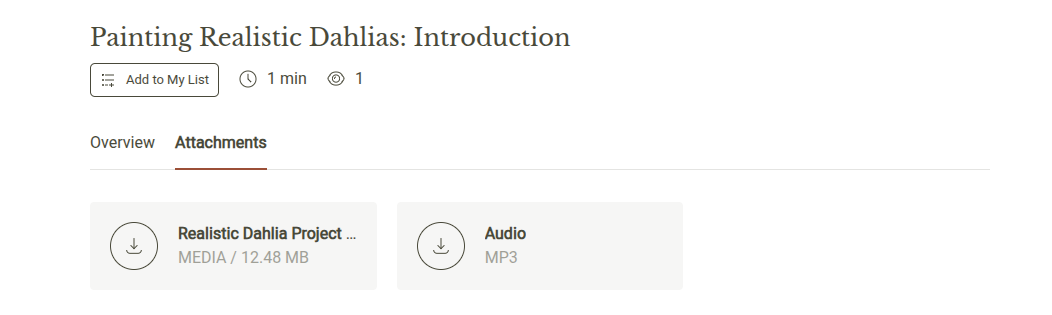
Please note: not all classes have traceable images available. Notably, any sort of loose painting won't have a traceable image, since Alex will be showing you how to draw with your brush without drawing in advance.